
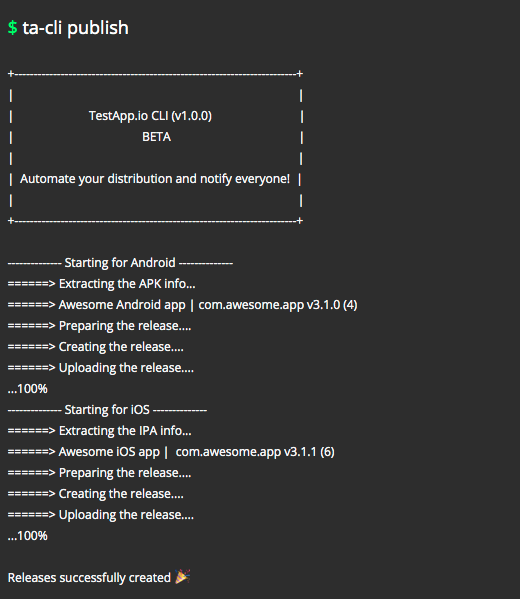
The official CLI for TestApp.io app distribution
Upload your Android (APK) and iOS (IPA) apps directly from the command line.
Notify your team instantly. Get feedback faster.
Quick Install
curl -Ls https://github.com/testappio/cli/releases/latest/download/install | bash
Works on macOS (Intel & Apple Silicon) and Linux (x86_64, ARM). For Windows, see below.
What is ta-cli?
ta-cli lets you upload app builds to TestApp.io without leaving your terminal. Perfect for:
- Local development - Quick uploads while coding
- CI/CD pipelines - Automated releases on every build
- Team collaboration - Notify testers instantly with each release
Features:
- Upload Android APK and iOS IPA files
- Automatic app info extraction (version, bundle ID, etc.)
- Git integration for release notes
- Team notifications
- Chunked uploads with automatic retry
- Cross-platform support
Installation
macOS & Linux
curl -Ls https://github.com/testappio/cli/releases/latest/download/install | bash
This installs to /usr/local/bin/ta-cli.
Windows
Download from Releases:
| File | Architecture |
|---|---|
ta-cli-Windows-x86_64.exe |
64-bit (recommended) |
ta-cli-Windows-i686.exe |
32-bit |
Rename it ta-cli.exe and add it to your PATH, or run it directly.
Verify Installation
ta-cli version
Quick Start
1. Get your credentials
| Credential | Where to find it |
|---|---|
| API Token | portal.testapp.io/profile/tokens |
| App ID | Your app page → Integrations tab at portal.testapp.io/apps |
2. Configure (interactive)
ta-cli config
Follow the prompts to enter your credentials.
3. Publish your app
ta-cli publish
That's it! Your app is uploaded, and your team is notified.
Commands
ta-cli publish
Upload your app to TestApp.io.
ta-cli publish [flags]
| Flag | Description | Default |
|---|---|---|
--api_token |
Your API token | From config |
--app_id |
Your App ID | From config |
--release |
android, ios, or both |
both |
--apk |
Path to Android APK file | From config |
--ipa |
Path to iOS IPA file | From config |
--release_notes |
Custom release notes | None |
--git_release_notes |
Use latest git commit as notes | false |
--git_commit_id |
Include commit ID in notes | false |
--notify |
Notify team members | false |
--archive_latest_release |
Archive previous release | false |
--config |
Custom config file path | ~/.ta-cli.json |
ta-cli config
Interactive configuration wizard.
ta-cli config
ta-cli version
Display version information.
ta-cli version
ta-cli completion
Generate shell autocompletion scripts.
# Bash
ta-cli completion bash > /etc/bash_completion.d/ta-cli

# Zsh
ta-cli completion zsh > "${fpath[1]}/_ta-cli"

# Fish
ta-cli completion fish > ~/.config/fish/completions/ta-cli.fish
Configuration
Config File
Location: ~/.ta-cli.json
{
  "api_token": "your_api_token",
  "app_id": "your_app_id",
  "release": "both",
  "apk": "/path/to/app.apk",
  "ipa": "/path/to/app.ipa",
  "release_notes": "",
  "git_release_notes": true,
  "git_commit_id": false,
  "notify": true,
  "archive_latest_release": false
}
Custom Config Path
ta-cli publish --config=/path/to/custom-config.json
Config Priority
- Command-line flags (highest priority)
- Config file specified by
--config .ta-cli.jsonin current directory~/.ta-cli.json(default)
Environment Variables
Use environment variables instead of config files (ideal for CI/CD):
| Variable | Description |
|---|---|
TESTAPPIO_API_TOKEN |
Your API token |
TESTAPPIO_APP_ID |
Your App ID |
TESTAPPIO_RELEASE |
Release type: android, ios, or both |
TESTAPPIO_ANDROID_PATH |
Path to APK file |
TESTAPPIO_IOS_PATH |
Path to IPA file |
TESTAPPIO_NOTIFY |
Send notifications: true or false |
TESTAPPIO_RELEASE_NOTES |
Custom release notes |
TESTAPPIO_GIT_RELEASE_NOTES |
Use git commit as notes: true or false |
TESTAPPIO_GIT_COMMIT_ID |
Include commit ID: true or false |
Example:
export TESTAPPIO_API_TOKEN="your_token"
export TESTAPPIO_APP_ID="your_app_id"
ta-cli publish --apk=./app.apk --release=android
CI/CD Integrations
ta-cli works with any CI/CD platform that supports bash. Just install and run!
Quick Setup (Any CI/CD)
# 1. Install ta-cli
curl -Ls https://github.com/testappio/cli/releases/latest/download/install | bash

# 2. Upload your app
ta-cli publish \
  --api_token=$TESTAPPIO_API_TOKEN \
  --app_id=$TESTAPPIO_APP_ID \
  --apk=./app-release.apk \
  --release=android \
  --notify=true
Dedicated Integrations (Recommended)
For the best experience, use our dedicated integrations with built-in auto-updates:
| Integration | Description | Link |
|---|---|---|
| GitHub Action | Native GitHub Actions integration | testappio/github-action |
| Fastlane Plugin | Native Fastlane plugin | testappio/fastlane-plugin-testappio |
Platform-Specific Guides
We have detailed guides for each CI/CD platform:
| Platform | Documentation |
|---|---|
| GitHub Actions | View Guide |
| Fastlane | View Guide |
| GitLab CI/CD | View Guide |
| Jenkins | View Guide |
| Bitrise | View Guide |
| CircleCI | View Guide |
| Travis CI | View Guide |
| Azure Pipelines | View Guide |
| Codemagic | View Guide |
| Xcode Cloud | View Guide |
Examples
Android Only
ta-cli publish \
  --release=android \
  --apk=./app-release.apk \
  --notify=true
iOS Only
ta-cli publish \
  --release=ios \
  --ipa=./App.ipa \
  --notify=true
Both Platforms
ta-cli publish \
  --release=both \
  --apk=./app-release.apk \
  --ipa=./App.ipa \
  --release_notes="Bug fixes and improvements" \
  --notify=true
With Git Integration
ta-cli publish \
  --git_release_notes=true \
  --git_commit_id=true \
  --notify=true
Archive Previous Release
ta-cli publish \
  --apk=./app-release.apk \
  --archive_latest_release=true \
  --notify=true
Supported Platforms
Operating Systems
| OS | Architectures | Binary |
|---|---|---|
| macOS | Intel (x86_64), Apple Silicon (arm64), Universal | ta-cli-Darwin-* |
| Linux | x86_64, ARM64 (aarch64), ARMv7, i686 | ta-cli-Linux-* |
| Windows | x86_64 (64-bit), i686 (32-bit) | ta-cli-Windows-*.exe |
Supported File Types
| Platform | File Type | Notes |
|---|---|---|
| Android | .apk |
Debug or release signed APK |
| iOS | .ipa |
Requires valid provisioning profile |
Updating
Re-run the install script to update to the latest version:
curl -Ls https://github.com/testappio/cli/releases/latest/download/install | bash
Check your current version:
ta-cli version
Uninstalling
sudo rm /usr/local/bin/ta-cli
rm ~/.ta-cli.json  # Optional: remove config
Troubleshooting
"command not found: ta-cli"
The binary isn't in your PATH:
# Option 1: Restart your terminal
# Option 2: Add to PATH manually
export PATH=$PATH:/usr/local/bin
# Option 3: Use full path
/usr/local/bin/ta-cli version
Upload Fails or Hangs
- Check internet connection
- Verify credentials - Ensure API token and App ID are correct
- Validate your file - Make sure the APK/IPA exists and isn't corrupted
- Retry - The CLI has automatic retry with exponential backoff
Invalid APK/IPA Error
- APK: Ensure it's a valid Android package with
AndroidManifest.xml - IPA: Ensure it contains
Info.plistand a valid provisioning profile
Config Issues
Reset your configuration:
rm ~/.ta-cli.json
ta-cli config
Windows-Specific Issues
- Run Command Prompt or PowerShell as Administrator if needed
- Use forward slashes or escaped backslashes in paths:
C:/path/to/app.apk
API Reference
For advanced integrations, see the TestApp.io API Documentation.
Support
| Resource | Link |
|---|---|
| Help Center | help.testapp.io |
| CLI Documentation | help.testapp.io/ta-cli |
| [email protected] | |
| Issues | GitHub Issues |
Need help? Contact us. we're happy to assist!